Check list
At the beginning of a new user beamtime login into user2bmb@arcturus then:
[user2bmb@arcturus]$ start_tomo
and check the user info screen:
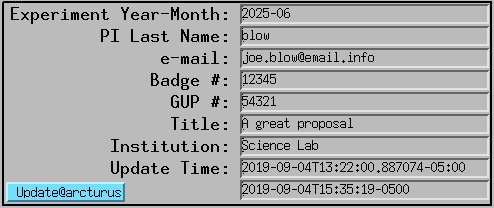
make sure the user PV are updated correctly from the scheduling system if not hit the update button for instructions or:
[user2bmb@arcturus]$ bash
[user2bmb@arcturus]$ conda activate dm
[user2bmb@arcturus]$ source /home/dm_bm/etc/dm.setup.sh
[user2bmb@arcturus]$ dmagic show
[user2bmb@arcturus]$ dmagic tag
you can also enter manually the user last name/email address then you can create standard (YYYY_MM/pi_last_name) user folders on petrel with:
[user2bmb@arcturus]$ bash
[user2bmb@arcturus]$ globus dirs
and you can share this folder will all users listed in the scheduled proposal with:
[user2bmb@arcturus]$ globus email --schedule
At the end of the user beamtime make a Globus copy between
[user2bmb@pg10ge]$ /local/data/YYYY-MM/PI_lastName/
and the same YYYY-MM/PI_lastName/ on petrel.