Data management
Data ownership and per-experiment access at 2-BM are managed by DMagic, which retrieves user information from the APS scheduling system and the experiment’s ESAF and updates the user-info PVs:
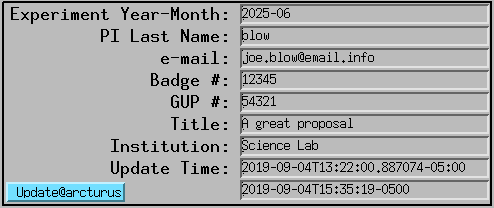
Run a user-PV update:
(base) [2bmb@arcturus]$ bash
(base) [2bmb@arcturus]$ conda activate dm
(dm)   [2bmb@arcturus]$ dmagic show
(dm)   [2bmb@arcturus]$ dmagic tag
You can also enter the user last name, email address, and YYYY-MM manually on the MEDM screen if needed.
Overview
The canonical home for every 2-BM experiment is Sojourner, the APS Data
Management storage system, mounted on the detector host tomdet and on
the analysis host tomo4 as /gdata. The per-experiment folder lives
at:
/gdata/dm/2BM/<yyyy-mm>/<yyyy-mm>-<PIlastname>-<GUP#>/
    data/      raw acquisition (*.h5 + *.config per scan)
    analysis/  reconstructions (<scan>_rec/)
    system/    DMagic-internal state
DMagic creates this folder skeleton when the experiment is registered. The
naming convention is <yyyy-mm>-<PIlastname>-<GUP#>; a GUP number of 0
indicates internal beamtime rather than a user proposal.
The default acquisition flow stages data through faster local tiers before landing on Sojourner:
[Detector]
     |  acquisition write (fast local NVMe)
     v
tomdet:/local1/2BM/<yyyy-mm>-<PIlast>-<GUP#>/
     |  tomoscan auto-upload, per-scan (FDT or scp)
     v
/data2  or  /data3   (NFS from tomodata2-ib / tomodata3-ib;
                      Infiniband-fast to the tomo1..tomo5 analysis nodes)
     |  tomocupy reconstruction on tomo1..tomo5  (tomo1 currently OOS)
     v
<scan>_rec/ alongside raw on /data2 or /data3
     |  operator-driven cp or mv from tomdet or tomo4
     v
/gdata/dm/2BM/<yyyy-mm>/<exp>/{data,analysis,system}/   (Sojourner, canonical home)
     |  Globus collection APS:DM:2BM, auto-shared to proposal + ESAF users
     v
[User download]
     |  APS DM tape-archive timer (programmable per experiment;
     |  default 1 year, was 3 months)
     v
[Tape]   (restorable with dm-restore-experiment)
tomdet and tomo4 are the only hosts with /gdata mounted directly.
tomo2, tomo3, and tomo5 have Infiniband-fast access to /data2
and /data3 but reach Sojourner only via dm-download (see below) or
Globus.
Writing raw data and reconstructions directly to /gdata from tomdet or
tomo4 works (both mount it), but performance is worse than the staged
local-tier route, so the staged pipeline is the default.
The supporting codebases are:
/home/beams/2BMB/conda/DMagic-decarlof/– creates experiment folders on/gdataand sets Globus ACLs from the proposal + ESAF user lists./home/beams/2BMB/epics/synApps/support/tomoscan/– the 2bmb subclass drives the per-scan auto-upload from/local1to/data2or/data3via FDT or scp./home/beams/2BMB/conda/tomocupy-decarlof– the reconstruction code that runs ontomo1..tomo5.
Move data to Sojourner
Once data (and reconstructions) are on /data2 or /data3, move them
to the canonical Sojourner home. This step is operator-driven; there is no
continuous DMagic sync at 2-BM. Run it from tomdet or tomo4, the two
hosts that mount /gdata directly. Example:
(base) 2bmb@tomdet $ cp -r /data2/2026-03-Pickering-1008279/data     /gdata/dm/2BM/2026-03/2026-03-Pickering-1008279/
(base) 2bmb@tomdet $ cp -r /data2/2026-03-Pickering-1008279/analysis /gdata/dm/2BM/2026-03/2026-03-Pickering-1008279/
Either cp or mv is acceptable. /data2 and /data3 fill quickly
and are cleared on capacity demand, so plan to migrate to /gdata while
the working copy is still available.
Delete files
To delete a folder of data already on Sojourner:
(base) [2bmb@arcturus]$ source /home/dm_bm/etc/dm.setup.sh
(dm-user) [2bmb@arcturus]$ dm-delete-files --experiment 2023-03-Xu --path-pattern LCO15v18b_232_rec

There are 75 files that match specified criteria. If you continue:

  1) Experiment files will be removed from storage.
  2) Experiment files will be removed from the catalog.

Proceed (yes|no)? [no]: yes
To delete a subset of files, use a pattern such as .*. For example, to
delete all TIFF files in the rkd10_024_rec folder:
(dm-user) [2bmb@arcturus]$ dm-delete-files --experiment test-delete-rec --path-pattern rkd10_024_rec/.*.tiff

There are 1852 files that match specified criteria. If you continue:
  1) Experiment files will be removed from storage.
  2) Experiment files will be removed from the catalog.

Proceed (yes|no)? [no]:
To apply this to all folders ending with _rec:
(dm-user) [2bmb@arcturus]$ dm-delete-files --experiment Stock-2020-11 --path-pattern .*_rec/.*.tiff
There are 154085 files that match specified criteria. If you continue:
  1) Experiment files will be removed from storage.
  2) Experiment files will be removed from the catalog.
The dm-delete-files command is recursive. For example, to delete all
*.tiff files in all subfolders of an experiment:
(dm-user) [2bmb@arcturus]$ dm-delete-files --experiment Parejiya-2022-04 --path-pattern /.*.tiff
Or to delete all recon_*.tiff files in all subfolders:
(dm-user) [2bmb@arcturus]$ dm-delete-files --experiment Drummond-2022-09 --path-pattern /recon_.*.tiff
Download
For hosts that do not mount /gdata (tomo2, tomo3, tomo5), or
for fetching back from tape, use dm-download. Example: download an
experiment (e.g. Finfrock-2022-12) from Sojourner to tomo2:/data2/:
(base)    [2bmb@tomo2 ~]$ source /home/dm_bm/etc/dm.setup.sh
(dm-user) [2bmb@tomo2 ~]$ dm-download --experiment Finfrock-2022-12 --destination-directory /data2/
External users typically pull via Globus instead; see
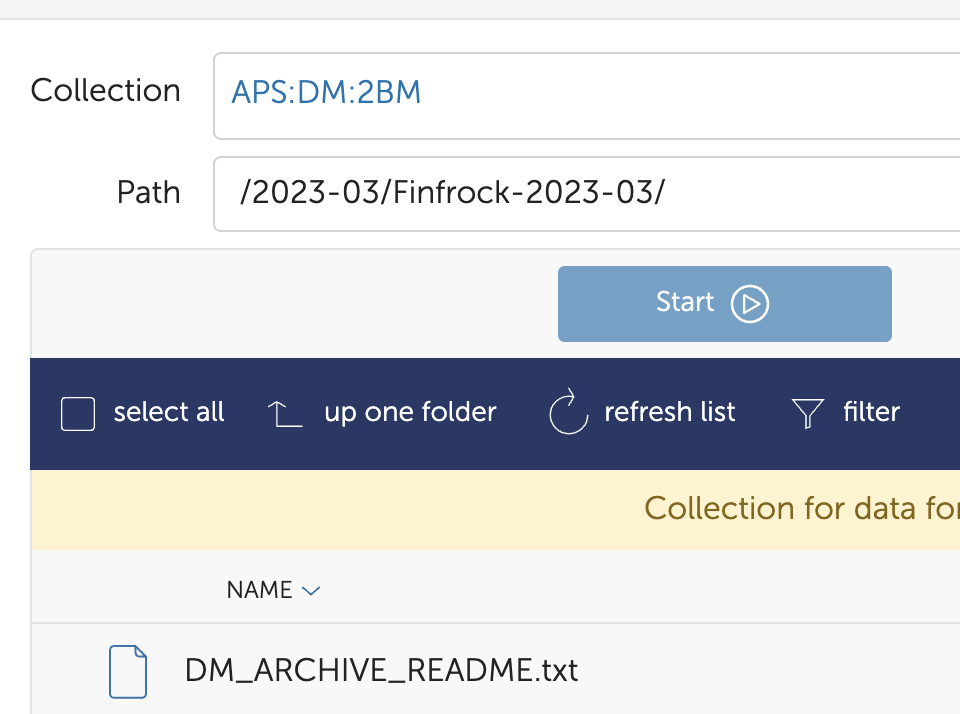
Data Download (collection APS:DM:2BM).
For additional details see the DM instructions:
Tape archive
APS Data Management archives each experiment from Sojourner to tape after
a programmable per-experiment timer. The current default at 2-BM is 1
year (raised from the prior 3-month default). To archive an experiment
(e.g. Finfrock-2023-03) to tape immediately, before the timer fires:
(base)    [2bmb@arcturus]$ source /home/dm_bm/etc/dm.setup.sh
(dm-user) [2bmb@arcturus]$ dm-archive-experiment --experiment Finfrock-2023-03
Pin / extend archive-to-tape date
The default 1-year archive timer can be extended per experiment. If you receive a notification email like:
Experiment Lu-2023-03 can be archived in 1 days, 22 hours (168205.33 seconds).
and want to extend the archival to tape date, run:
(base)    [2bmb@arcturus]$ source /home/dm_bm/etc/dm.setup.sh
(dm-user) [2bmb@arcturus]$ dm-pin-experiment --experiment Lu-2023-03 --n-days 90
id=12322 name=Lu-2023-03 experimentTypeId=32 experimentStationId=23 updateDate=2026-02-06 13:21:24.826141-06:00 startDate=2023-03-24 00:00:00-05:00 endDate=2023-03-27 00:00:00-05:00
To verify the pinned status of an experiment:
(dm-user) dmadmin@s2bmdm> dm-get-experiment --experiment Lu-2023-03 -a -pp | grep pinned
  'pinnedAtTime': '1771565030.0576963',
  'pinnedAtTimestamp': '2026/02/19 23:23:50',
  'pinnedByUser': 'user2bm',
  'pinnedUntilTime': '1779341030.0576963',
  'pinnedUntilTimestamp': '2026/05/21 00:23:50',
Tape restore
To restore an experiment (e.g. Finfrock-2023-03) from tape to its
original location on Sojourner:
Run:
(base)    [2bmb@arcturus]$ source /home/dm_bm/etc/dm.setup.sh
(dm-user) [2bmb@arcturus]$ dm-restore-experiment --experiment Finfrock-2023-03
id=0293f99b-c724-402f-af94-1f2606499d96 name=restoreArchive experimentName=Finfrock-2023-03 status=pending
Check the status of the restore process with:
(dm-user) [2bmb@arcturus]$ dm-restore-experiment --experiment Finfrock-2023-03
Unfinished archive task with id 0293f99b-c724-402f-af94-1f2606499d96 already exists for experiment Finfrock-2023-03
or:
(dm-user) [2bmb@arcturus]$ dm-get-archive-task --id 0293f99b-c724-402f-af94-1f2606499d96 --display-keys ALL
To list all tasks:
(dm-user) [2bmb@arcturus]$ dm-list-archive-tasks
Add users
DMagic auto-populates the per-experiment Globus ACL from the proposal user list and the ESAF user list. To grant an additional user read access to datasets in an experiment (for example, when adding a collaborator after the beamtime):
(base)    [2bmb@arcturus]$ source /home/dm_bm/etc/dm.setup.sh
(dm-user) [2bmb@arcturus]$ dm-add-user-experiment-role --experiment expName --username d<badge> --role User
Find the d<badge> identifier with:
(dm-user) dmadmin@s2bmdm> dm-list-users | grep -i decarlo
Example:
dm-add-user-experiment-role --experiment McDowell-2023-03 --username d240474 --role User
dm-add-user-experiment-role --experiment Finfrock-2022-12 --username d240474 --role User
dm-add-user-experiment-role --experiment Finfrock-2023-03 --username d240474 --role User
Search
To search for experiments whose name contains Pete:
(base)    tomo@tomodata1 ~ $ source /home/dm_bm/etc/dm.setup.sh
(dm-user) tomo@tomodata1 ~ $ dm-list-experiments | grep Pete
id=8862  name=Peters-2022-03  experimentTypeId=30 experimentStationId=21 startDate=2022-03-04 00:00:00-06:00 endDate=2022-03-07 00:00:00-06:00
id=11275 name=Peteres-2022-11 experimentTypeId=30 experimentStationId=21 startDate=2022-11-28 00:00:00-06:00 endDate=2022-12-01 00:00:00-06:00
To list files within an experiment:
(base)    tomo@tomodata1 ~ $ source /home/dm_bm/etc/dm.setup.sh
(dm-user) tomo@tomodata1 ~ $ dm-list-experiment-files --experiment=Peters-2022-03 | grep Peters | head -10
id=625daab87f44b25ba39bfdb7 fileName=C4_Zn_01_10keV_980.h5      experimentFilePath=Peters/C4_Zn_01_10keV_980.h5      fileSize=272374112 md5Sum=516bb84b52e5b8d2347aea847fd94a50
id=625daabb7f44b25ba39bfdb8 fileName=C4_Zn_03_10keV_try2_977.h5 experimentFilePath=Peters/C4_Zn_03_10keV_try2_977.h5 fileSize=171670144 md5Sum=4f8f374f72cea16f5a8325ea44a83338
id=625daabd7f44b25ba39bfdb9 fileName=C4_Zn_03_10keV_try2_975.h5 experimentFilePath=Peters/C4_Zn_03_10keV_try2_975.h5 fileSize=226080308 md5Sum=21a3f1a5c7e292b0f43cabc96aaa16b7
Legacy upload via dm-station-gui
The DMagic GUI is still available and is occasionally used for retrospective
uploads of legacy data (for example, lifting old datasets off tomo1:/data
into the APS DM catalog). It is not the default for new acquisitions, which
flow through the staged pipeline described in the Overview above.
To upload data with the GUI:
(base) [2bmb@arcturus]$ bash
(base) [2bmb@arcturus]$ source /home/dm_bm/etc/dm.setup.sh
(dm-user) [2bmb@arcturus]$ dm-station-gui
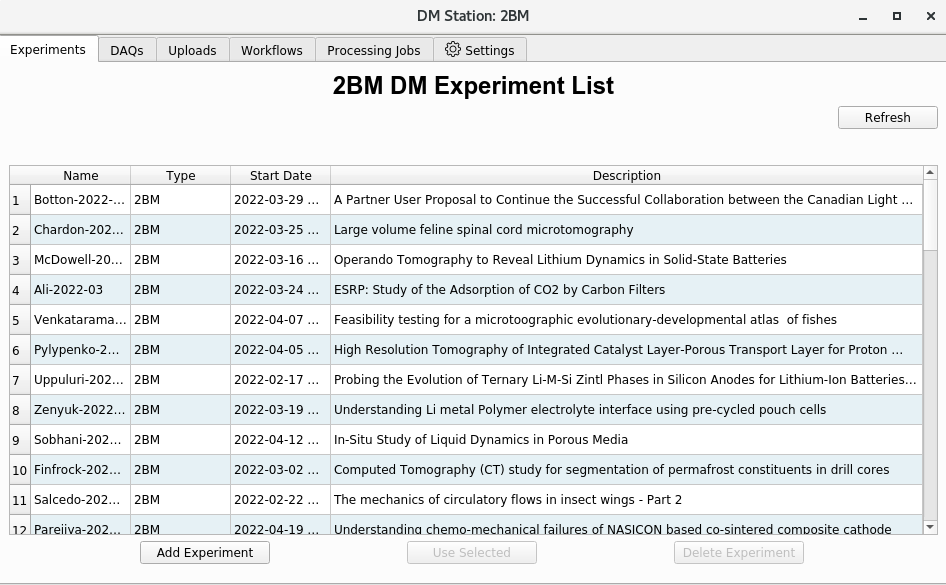
Click Start New:
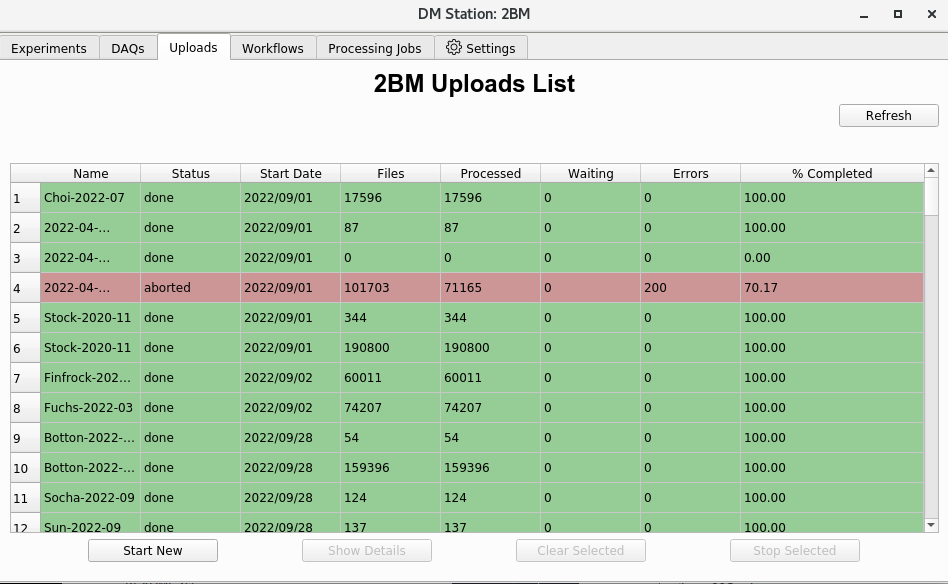
Then select Add Experiment:
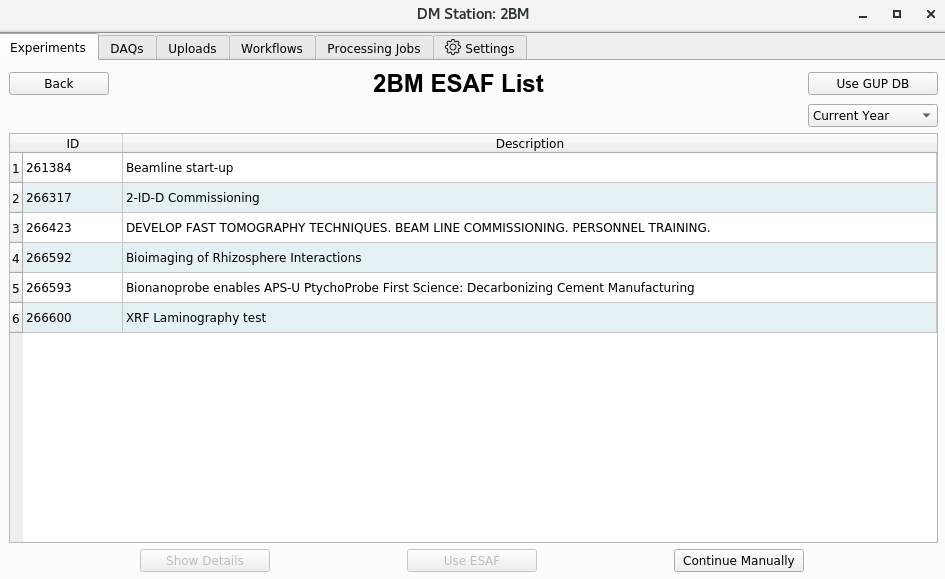
Select the GUP associated with the data set, or choose Continue Manually if there is no GUP (e.g. internal time):
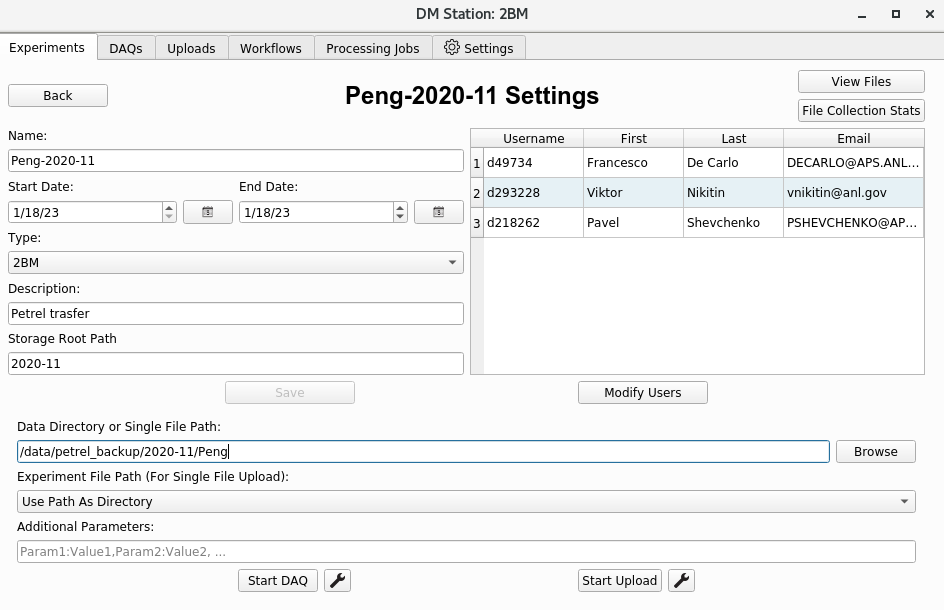
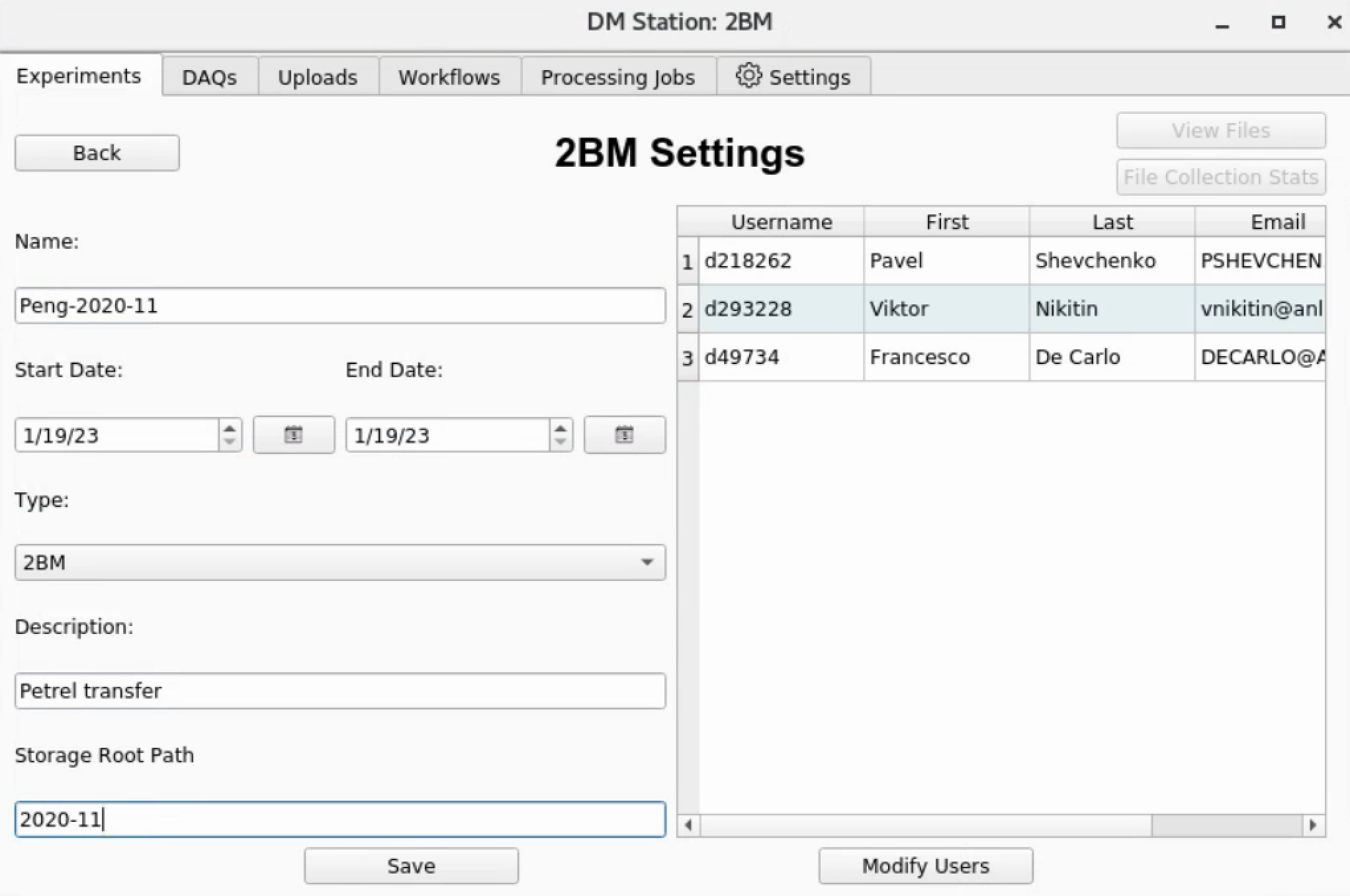
Set the experiment Name, Dates, Type, Storage Root Path, etc., then click Save:
After the experiment is created, specify the data location on
tomo1 (e.g. /data/...) in the Data Directory or Single file
field: